


What Prepress Bottlenecks Really Cost Your In-plant

An internal department submits a booklet marked "final." Prepress opens the file and finds RGB images where the workflow requires CMYK, missing bleed, and a page count that does not match the job ticket. The operator quietly fixes everything in about 10 minutes, because fixing it is faster than explaining it. The job ships on time, and everyone is happy.
Except that correction was never recorded. The submitting department never learns its template is broken, so the same file arrives the same way next month. Prepress keeps absorbing unplanned work that appears nowhere in the shop's numbers. Multiply that quiet fix by every department you serve and every recurring job you run, and unrecorded corrections can become a significant unmeasured cost in the operation.
Behind every example in this article sits one principle: a file is not a production-ready job until the artwork, the production specifications, the approval, and the output requirements all agree.
The Four Stages of the Prepress Cost Cascade
The same problem costs more the later it is caught. Follow a single issue – say a cover built without bleed on a booklet that trims to the edge – through four possible points of discovery.
- Caught at intake. The cost is contained: a clarification message, a replacement file, or a small correction made with the submitter's knowledge.
- Caught after proofing begins. The shop has already invested proof preparation and started an approval cycle. Now there is a version two, an approval trail to untangle, and, if a page count or finishing instruction changed along the way, a setup that has to be rebuilt.
- Caught at the DFE, RIP, or digital press. The problem starts interrupting other work. The job comes out of the queue, the schedule shifts, and jobs that were ready wait behind one that was not. If output has already started, test or rejected sheets consume substrate and may generate click charges before anyone stops the run.
- Caught after printing or finishing. The shop may face a complete reprint with repeated click charges, additional finishing, expedited delivery, or outside production to save the date.
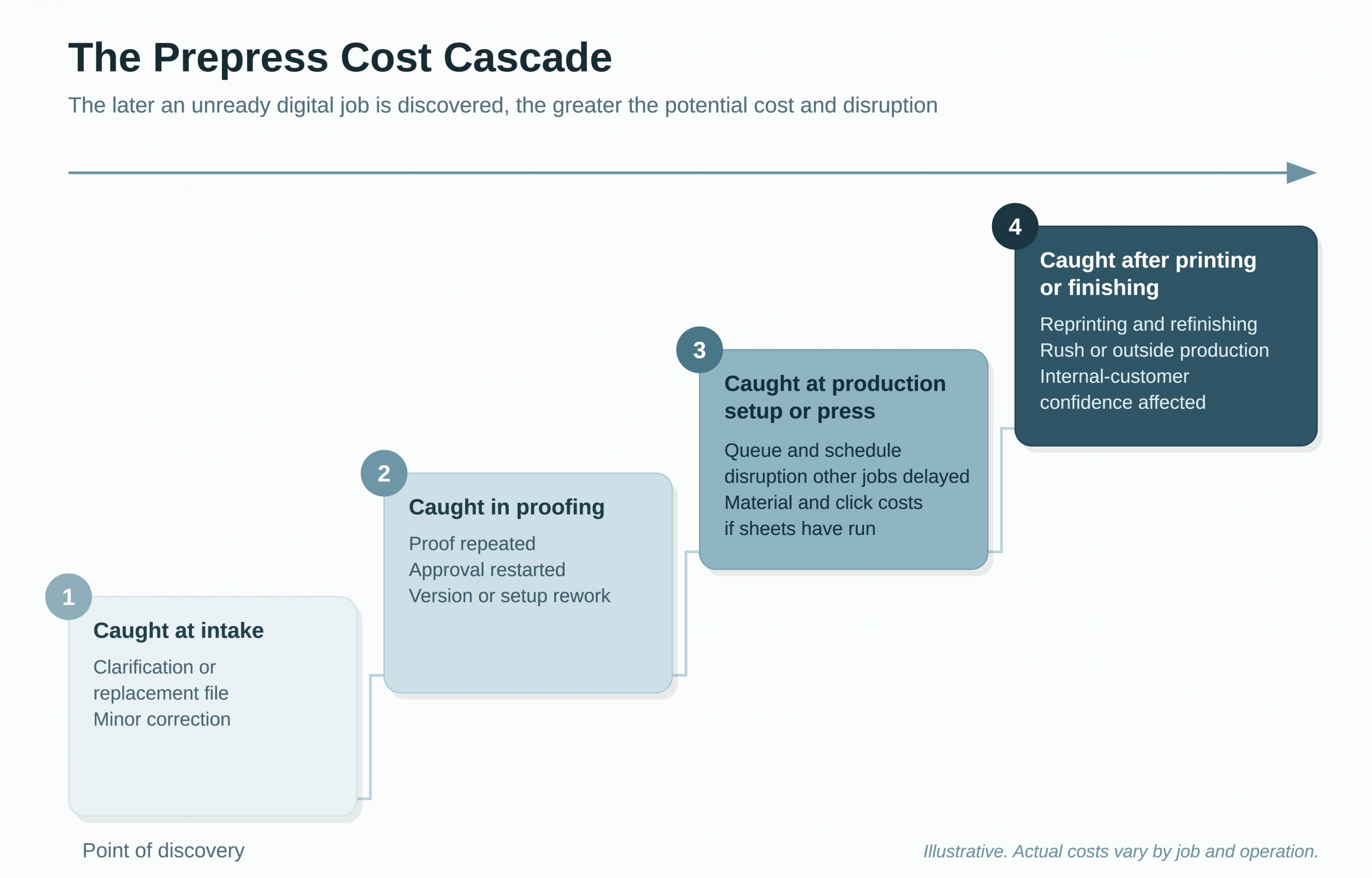
One of the most damaging costs at this stage is not on any invoice: an internal customer who loses confidence in the in-plant and starts wondering what an outside printer could do.
You do not need an industry multiplier to act on this. Your own labor rate, substrate cost, and click rate tell the story.
A Digital Job Readiness Gate
The cascade justifies a simple control: nothing releases to production until it passes a four-part readiness check.
- File readiness. Page dimensions, bleed, fonts, image resolution, color handling, transparency, and required marks are confirmed against the requirements of your actual DFE, RIP, presses, substrates, and finishing lineup. A generic preflight checklist may not account for all of this; the settings that matter are the ones tied to your actual production workflow.
- Production readiness. Quantity, finished size, stock, simplex or duplex, finishing, delivery requirements, and due date are complete before the job is released into production, not discovered during it.
- Data readiness. For variable data work, field names, record counts, formats, and missing values are validated against the template before the first proof, because a data problem found after proofing restarts the cycle.
- Approval readiness. The approved artwork version is identified, the authorized approver is named, and everyone understands the point at which further content changes begin moving the promised delivery date.
Calculate the Cost of One Exception
When a job fails the gate, or gets fixed silently anyway, it becomes an exception, and an exception has a price you can compute:
Exception cost = correction labor cost + administrative and communication labor cost + additional proofing cost + production interruption cost + wasted substrate, finishing, and click charges + outside or expedited costs.

Enter the time first, then convert it to cost at your own loaded labor rate.
Every figure comes from your own operation. Whether or not your in-plant charges departments directly, the total supports cost recovery discussions, staffing requests, customer education, and decisions about where automation would actually pay.
Stop Making Corrections Invisible
Helping an internal customer is not the same as silently absorbing incomplete work. The difference is documentation. Record each correction with one specific reason. Tell the submitter what was changed and why. Provide the corrected template or submission instructions so the fix happens once. Save approved corrections for recurring jobs. Escalate the exceptions that keep repeating and keep affecting turnaround.
None of this requires an adversarial submission process. The goal is not to reject internal customers; it is to stop prepress from operating as an undocumented design and troubleshooting department.
Create a Controlled Path for Repeat Work
Business cards, departmental booklets, course materials, forms, and event programs should not restart from zero each time they are ordered. Controlled master templates, approved logos and brand assets, locked production specifications, named content fields, and preserved imposition and finishing settings turn a recurring job into a repeatable one. Clear ownership of content changes keeps it that way.
This is where readiness pays twice: jobs that enter through a controlled path rarely fail the gate at all.
Review Exceptions, Not Every Job
You do not need to measure everything to start. For the next 30 days, log only the jobs that fail the readiness gate. Give each one a reason, and record the total number of jobs processed in the same period so you can calculate a rate, not just a count: exception rate = jobs failing the readiness gate divided by total jobs processed.
At the end of the month, group the exceptions by cause, run the worksheet on the most common one, and fix that single source of failure.
Then look again. A falling exception rate becomes your evidence for automation priorities, staffing conversations, turnaround commitments, and cost recovery, built entirely from your own shop's numbers.
The most expensive problems in prepress are the ones no one writes down. A 30-day log is how you start writing them down.
- Categories:
- Pre-Press - Proofing
Kevin Bharmal handles prepress for high-volume print operations at Alpha Prepress, with experience in file preparation, preflight, variable data, and production-ready output across digital print workflows. www.alphaprepress.com


